CRA Login: Sign In to Your CRA Account
Need to check your tax information, benefits, or tax notices online? You first need to sign in to your Canada Revenue Agency (CRA) account.
This guide shows you how to log in step by step using any of the three sign-in methods: a Sign-In Partner (online banking), a CRA user ID and password, or a provincial partner (BC and Alberta only). You’ll also learn what each CRA account is for and how to fix common problems, such as a forgotten password or a locked account.
What Is CRA Login?
CRA login refers to signing in to your Canada Revenue Agency (CRA) account. It gives you access to an official online portal that lets Canadians check tax information and notices and manage their account online, instead of visiting an office in person.
You can sign in using one of three methods: a Sign-In Partner (online banking), a CRA user ID and password, or a provincial partner (BC and Alberta only). All of these methods lead to your CRA account, which includes My Account, My Business Account, and Represent a Client.
After signing in to your account, you can:
- View tax notices
- Check the status of your tax return and refund
- See your RRSP deduction limit and TFSA contribution room
- Securely manage your personal information
How to Log In to Your CRA Account
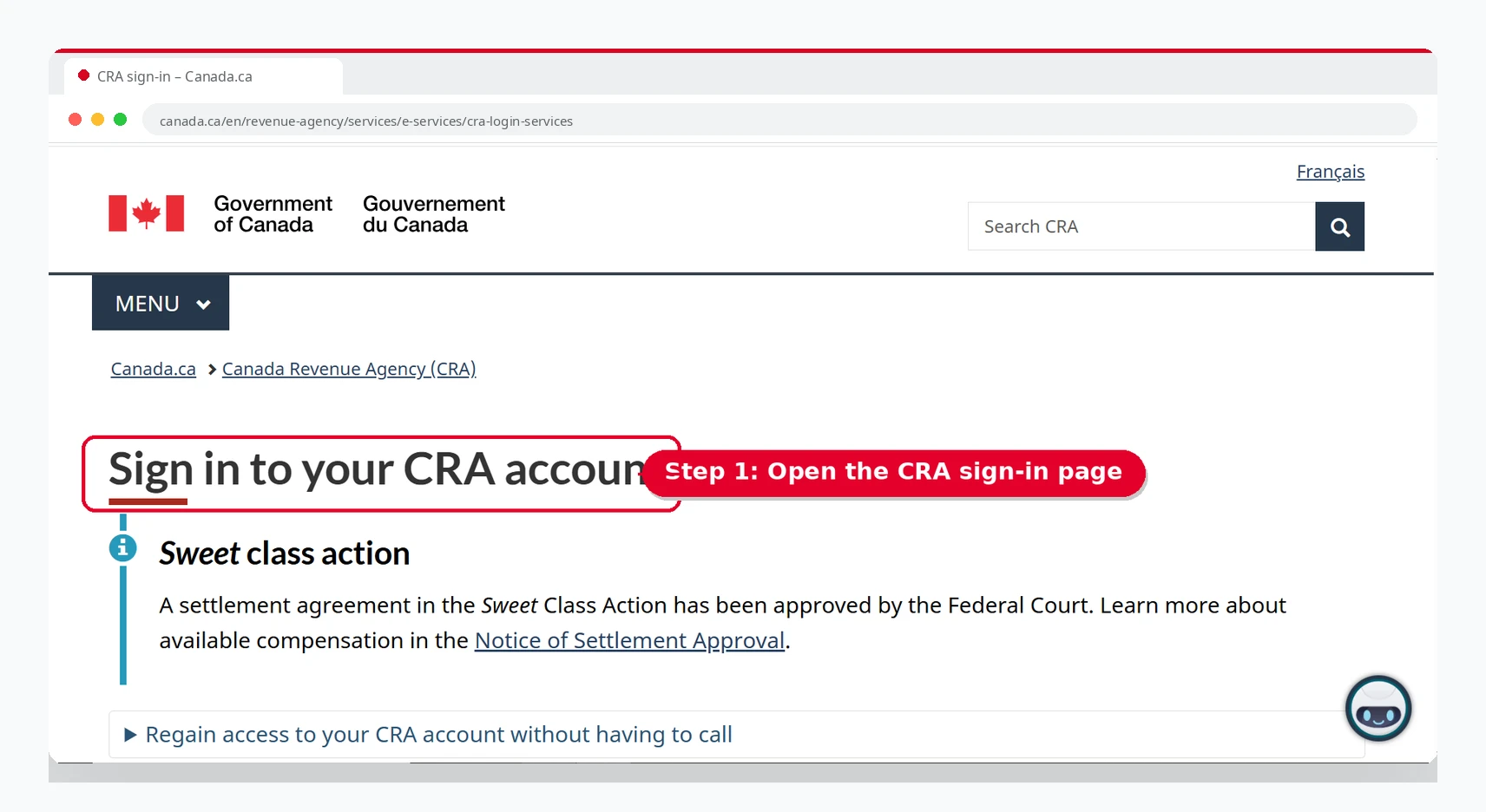
To access your Canada Revenue Agency (CRA) account, you first need to sign in. Follow the steps below.
Open the CRA login website
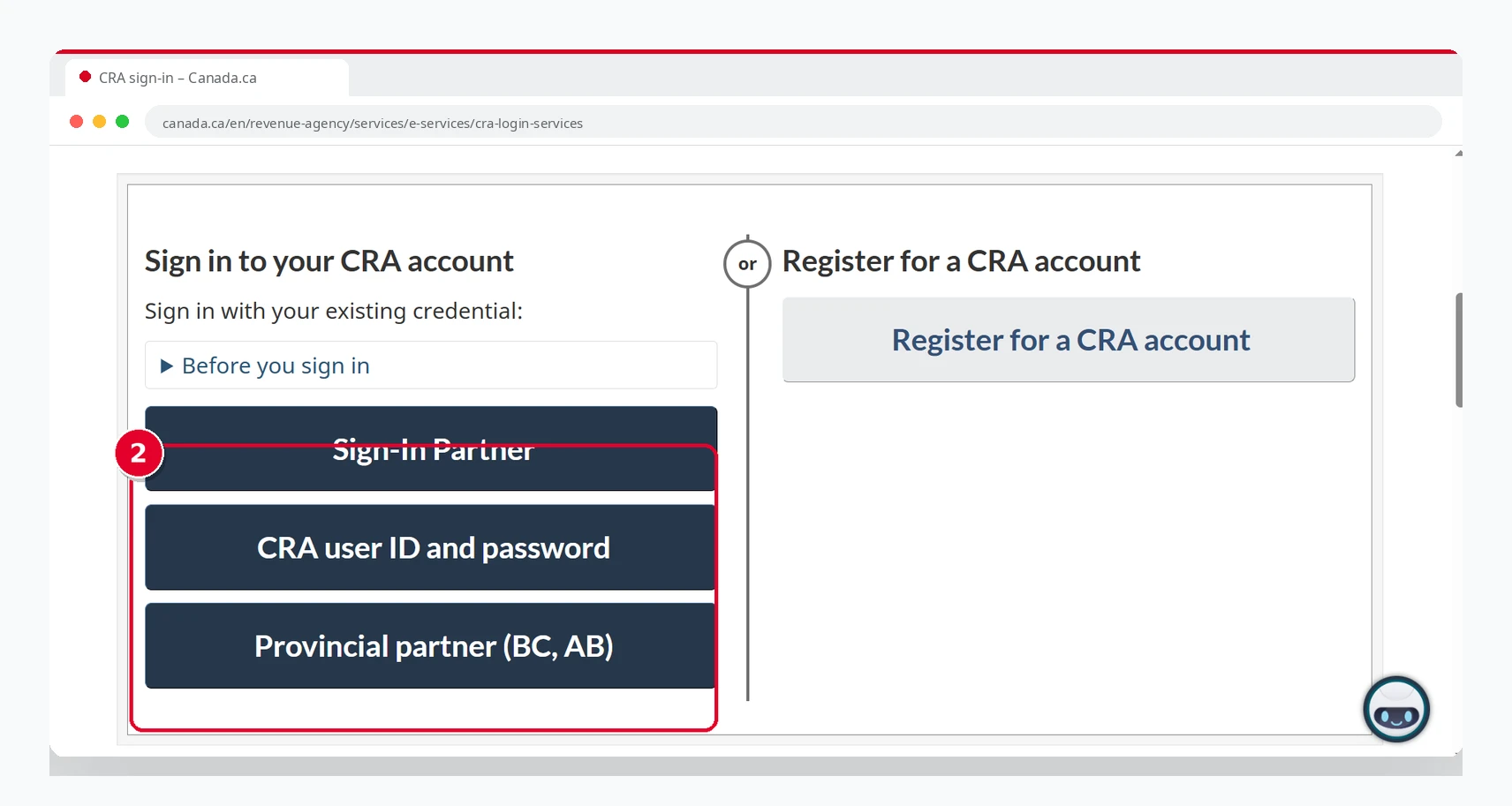
Choose your sign-in method
Sign-In Partner, CRA User ID, or Provincial Partner.
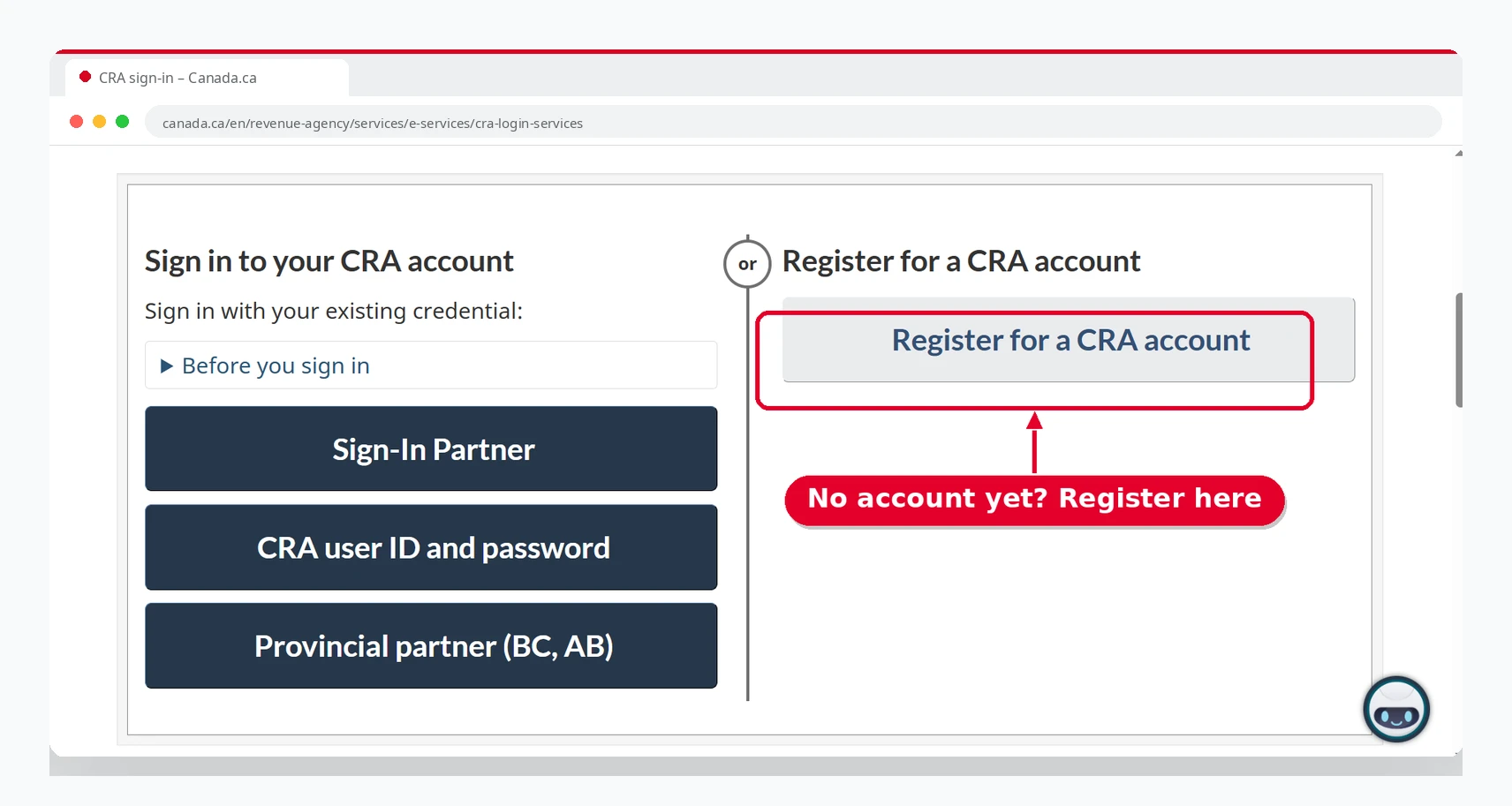
No account yet? Register first, then sign in
Enter the sign-in details for the method you chose
Type your online banking details if you chose a Sign-In Partner, your CRA user ID and password if you registered directly with the CRA, or your BC Services Card or Alberta.ca details if you chose a provincial partner. Before you type anything, check that the address bar shows canada.ca or your bank’s official website.
Complete multi-factor authentication (MFA) when asked
The CRA asks for a one-time passcode to confirm it’s really you. Depending on what you set up, the code comes by text message or phone call, from an authenticator app, or from your printed passcode grid. Enter the code and continue.
Manage your CRA account
Once you are logged in, you will be able to manage your CRA account.
CRA Login Methods
You can log in to your CRA account using any of these methods. Select the one that is most convenient for you.
CRA Sign-In Partner (Online Banking) Login
Go to the CRA login page
Open canada.ca and search for “CRA sign in”, or type the address yourself. Avoid sign-in links in emails or text messages, because scammers often copy the CRA login page.
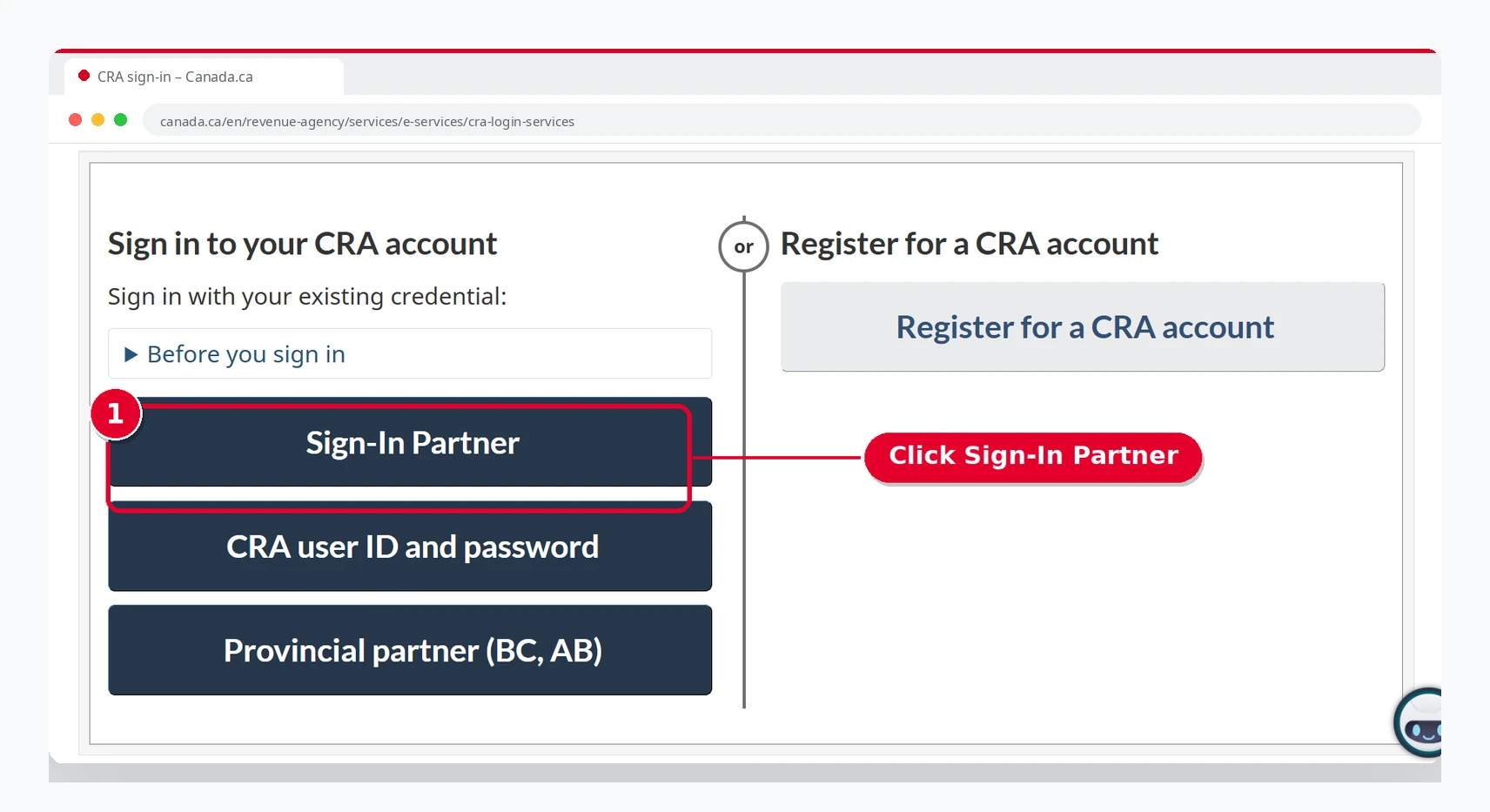
Select the sign-in partner option
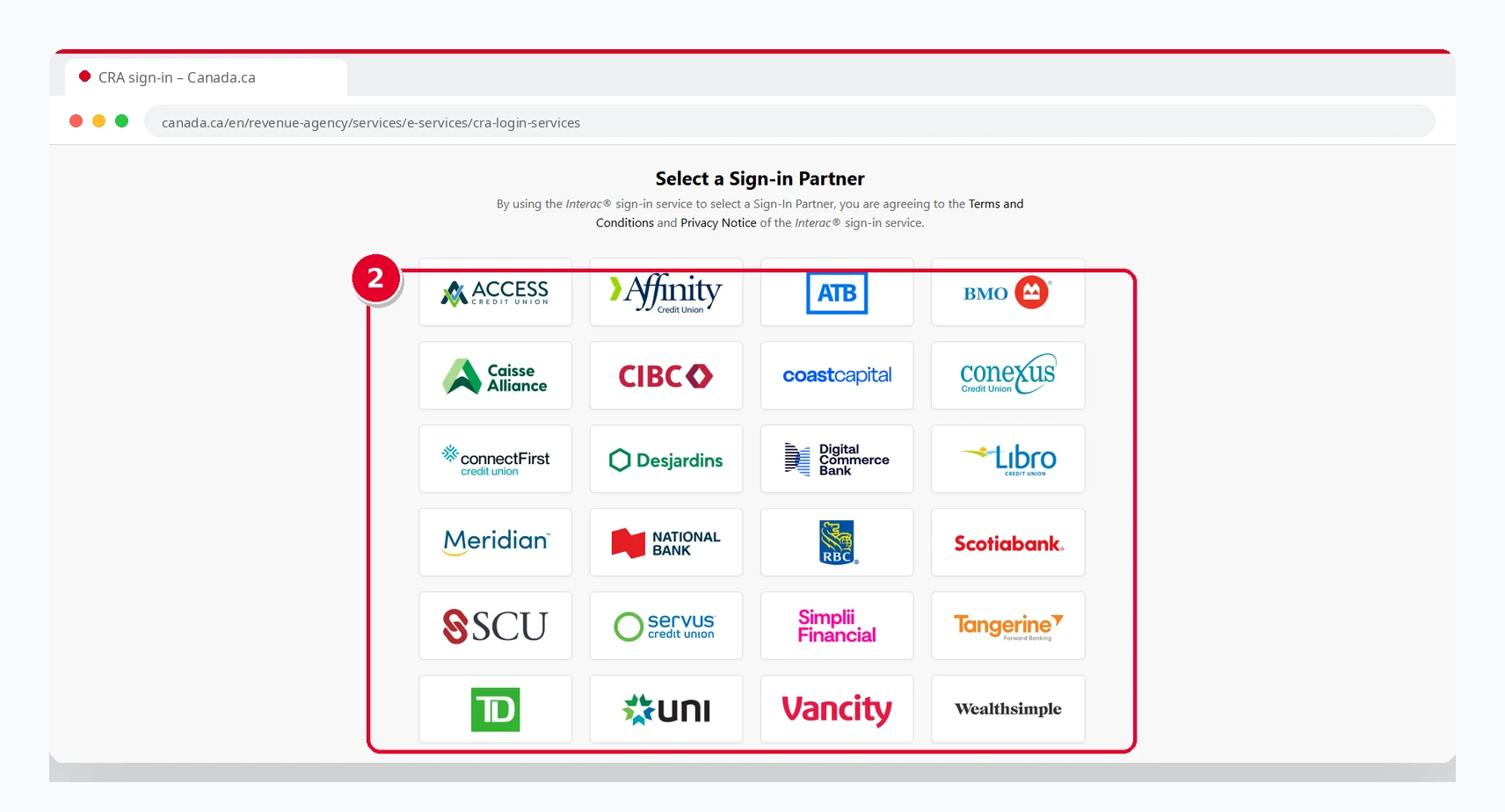
Select your bank
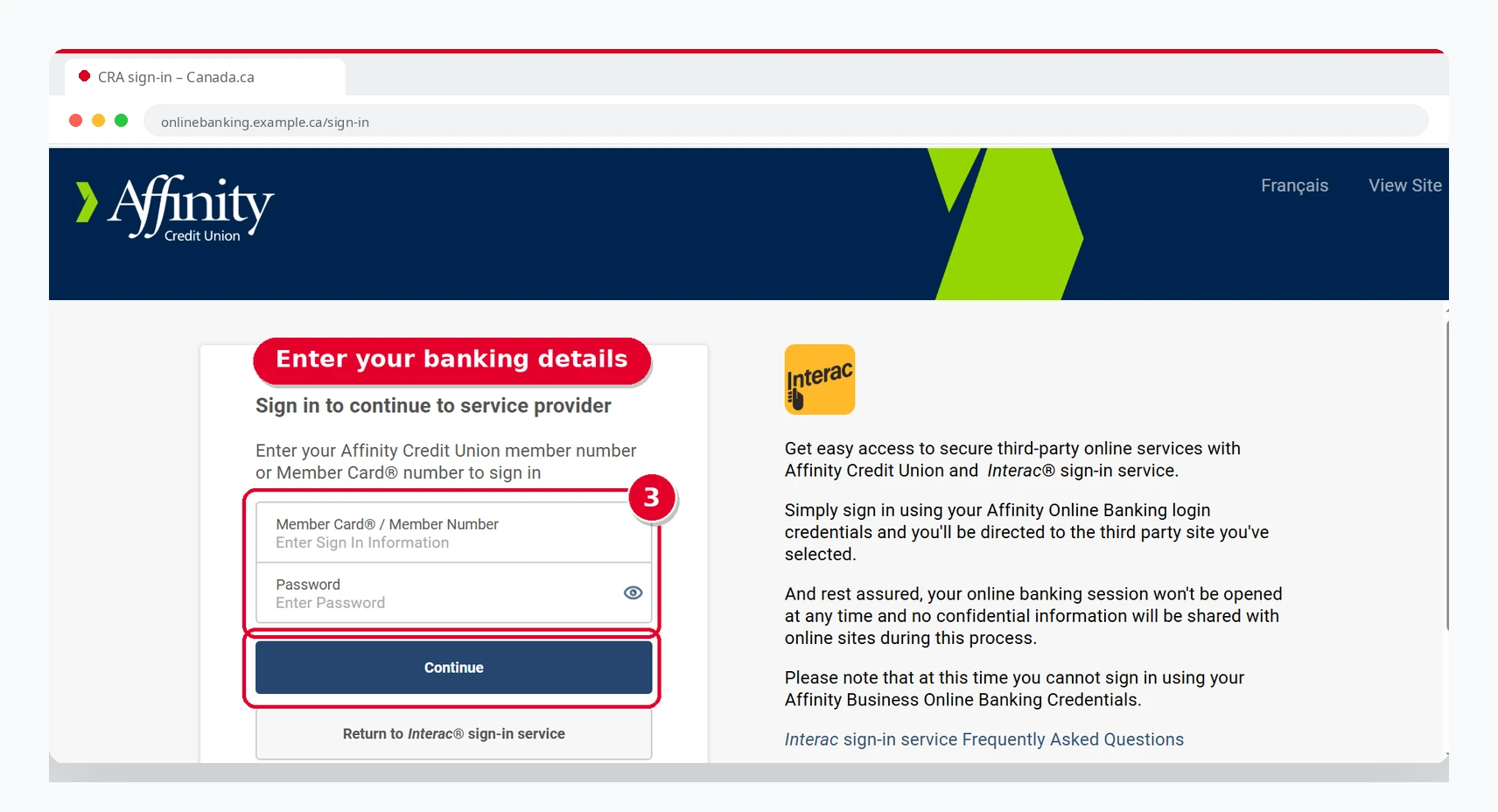
Enter your online banking username and password
Complete multi-factor authentication (MFA)
After your bank confirms your identity, you are sent back to the CRA. Enter the one-time passcode from the method you set up (phone, authenticator app or passcode grid) to finish signing in.
Get redirected to your CRA account
After successful verification, you will be redirected to your CRA account.
CRA User ID and Password Login
Open the CRA login page
Go to the CRA sign-in page on canada.ca. You’ll see the three sign-in options listed together on the same page.
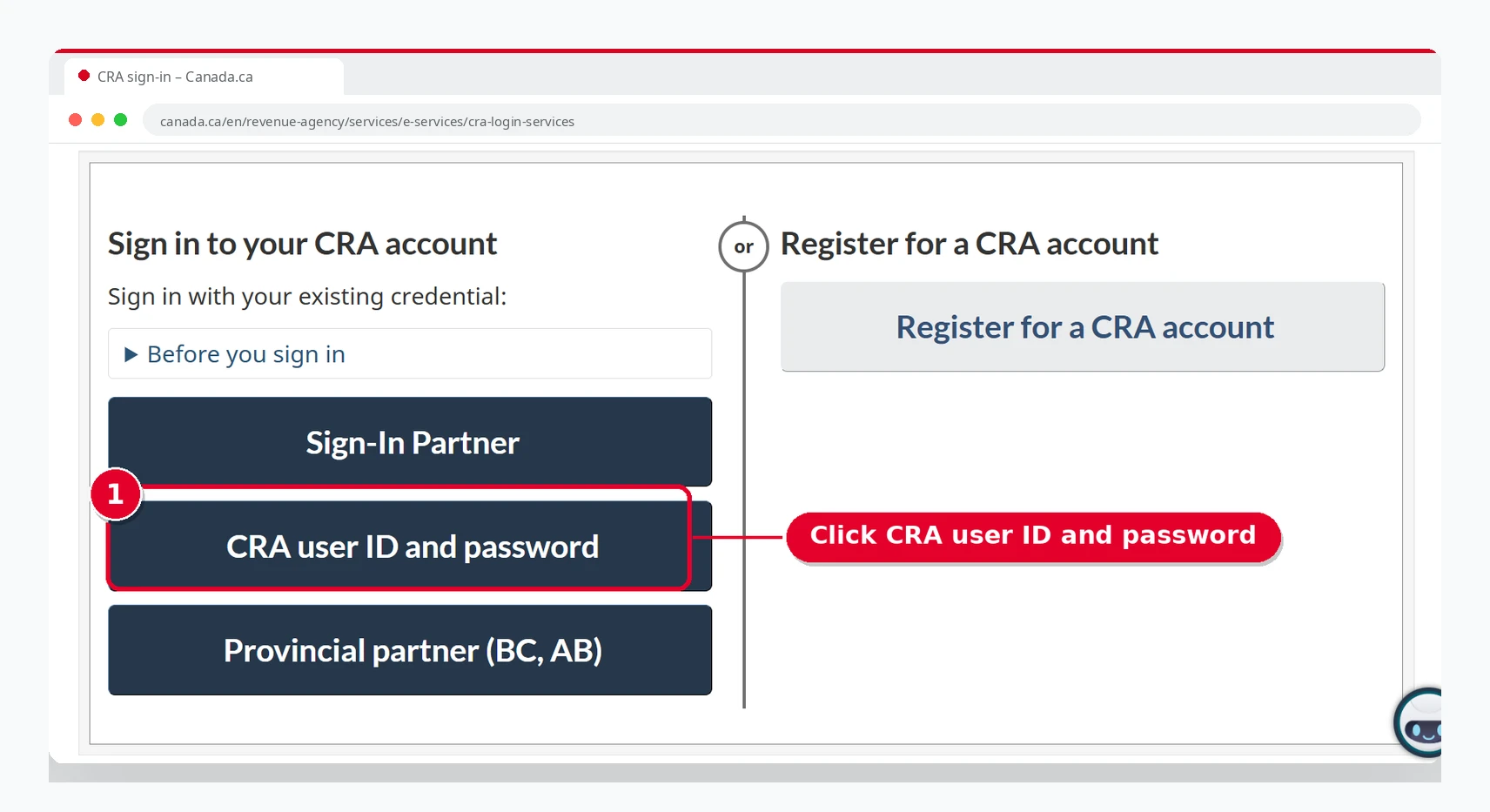
Select the user ID and password method
Enter the credentials you created when you registered
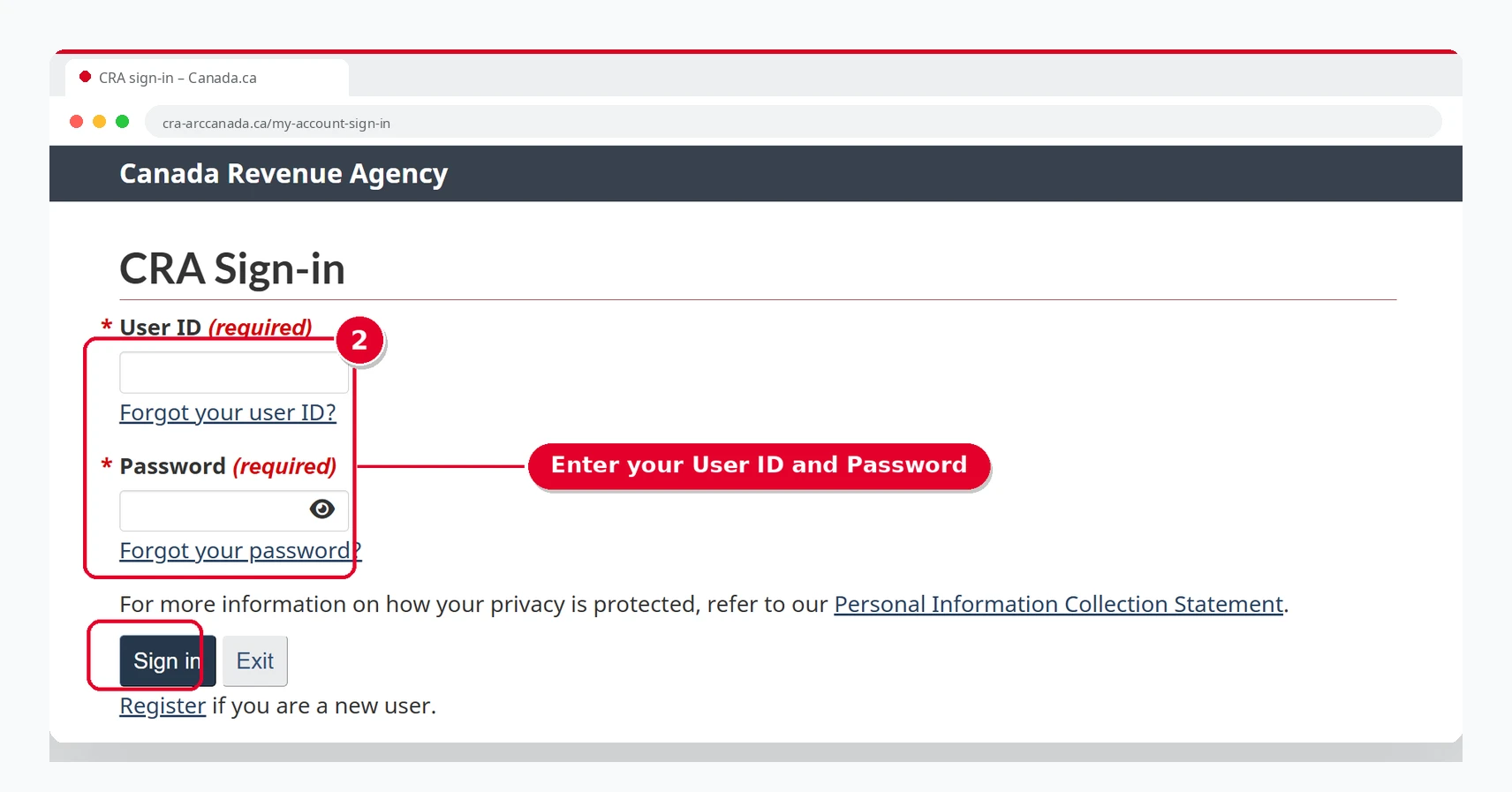
Complete multi-factor authentication (MFA)
Enter the one-time passcode sent to your phone, shown in your authenticator app, or taken from your passcode grid. If you no longer have access to your MFA method, use the option to regain access on the sign-in page.
Get redirected to your CRA account
If your details are correct, you’ll be redirected to your CRA account.
Forgot your password? Select “Forgot your password?”, enter your CRA user ID, and answer your security questions.
Provincial Partner Login (BC Services Card / Alberta.ca)
Only for BC and Alberta. This option is only available to residents of British Columbia and Alberta.
Go to the CRA login page
Open the CRA sign-in page on canada.ca. This option is useful only if you already have a BC Services Card account or an Alberta.ca Account.
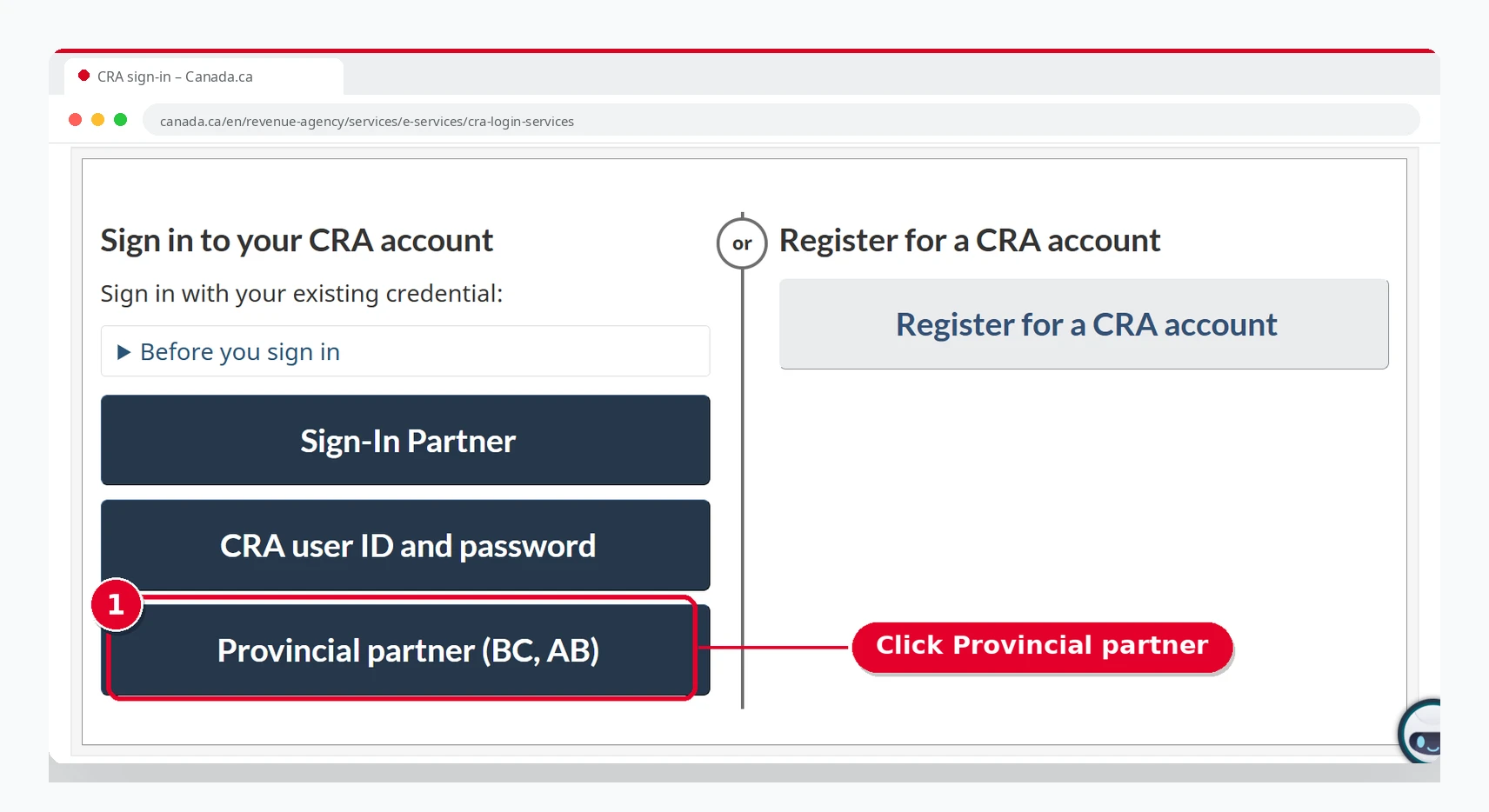
Select the Provincial Partner option
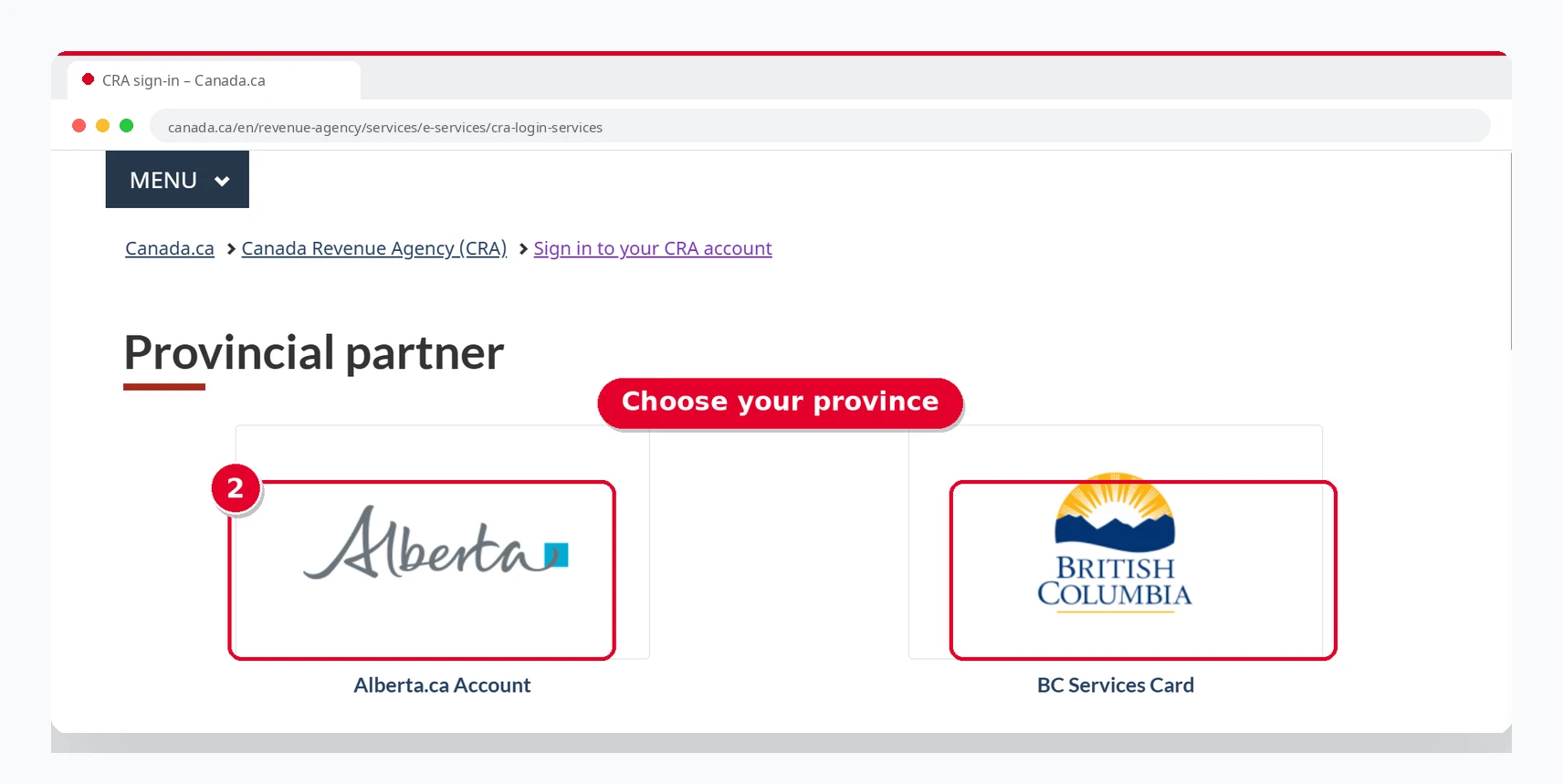
BC Services Card or Alberta.ca.
Choose BC Services Card or Alberta.ca Account
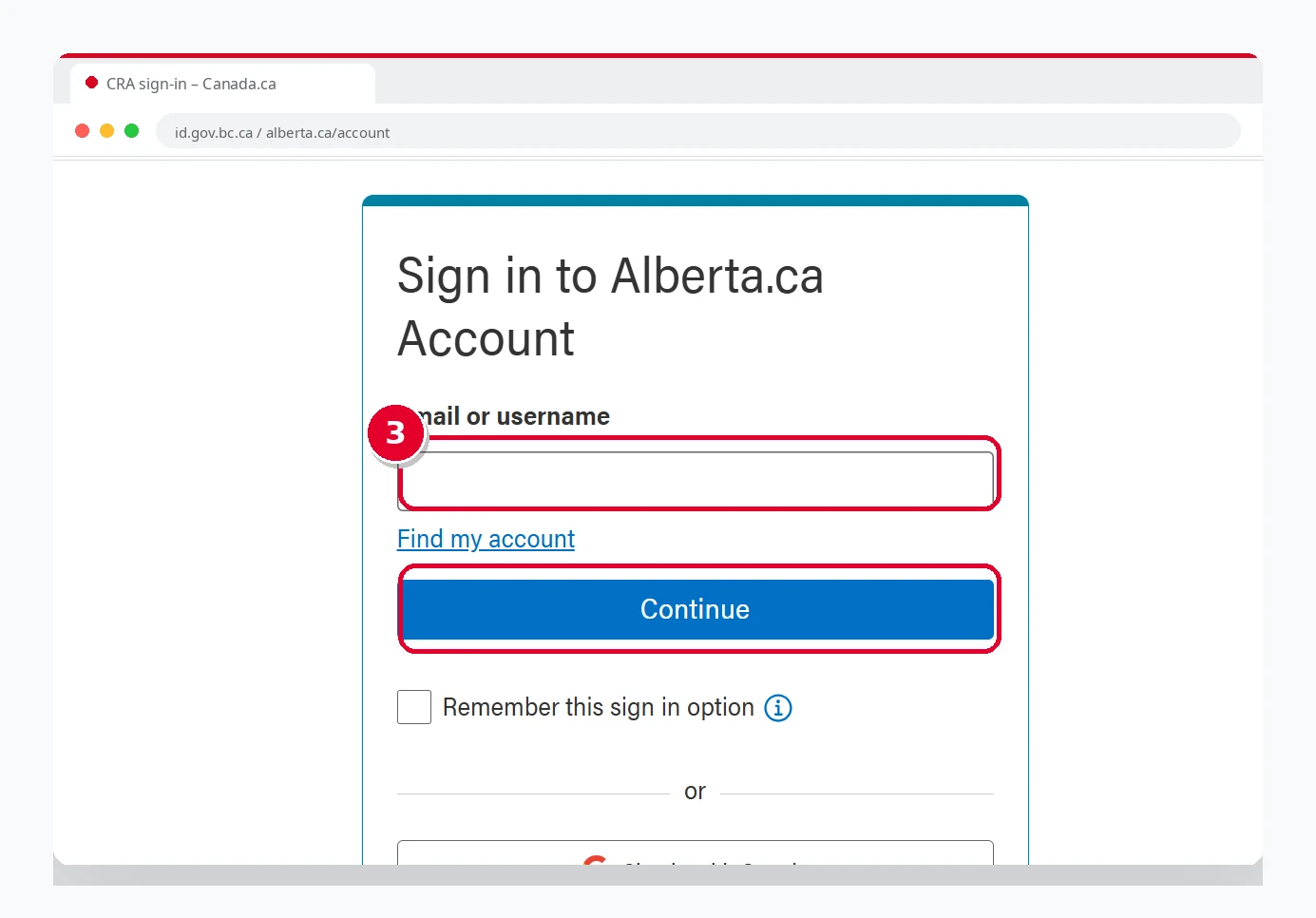
Click “Agree” and sign in
Sign in using your existing provincial details.
CRA My Account Login vs. My Business Account vs. Represent a Client
| CRA My Account | My Business Account | Represent a Client |
|---|---|---|
| For individuals | For businesses | For authorized representatives |
| Manage personal tax and benefit information. | Manage business tax accounts. | Manage tax information for another person or business. |
| Access personal tax, benefits, notices, and payments. | Access GST/HST, payroll, corporation income tax, and other business accounts. | Access authorized clients’ individual, business, or trust tax information. |
| Used by individual taxpayers | Used by business owners and authorized users | Used by accountants, bookkeepers, tax professionals, or anyone signing in on someone else’s behalf (including family and friends) |
Common CRA Login Problems and Fixes
Forgot CRA Login Password
If you’ve forgotten your password, go to the CRA sign-in page, select “CRA user ID and password,” and click “Forgot your password?” Enter your CRA user ID, then answer the security questions you set up when you registered and follow the on-screen instructions.
If you’ve forgotten your user ID, select “Forgot your user ID?” instead. You will need to confirm your identity with your SIN, your date of birth, and an amount from a recent tax return, then answer your security questions.
CRA Login Not Working / Page Down
Before logging in to your account, check whether the CRA sign-in service is available because regular maintenance takes place between 3 a.m. and 6 a.m. Eastern Time. Also, if you’re experiencing slow loading, refresh the page and wait for a few seconds.
Locked Out After Too Many Attempts
If you enter the wrong user ID, password, or other sign-in information too many times (including your MFA passcode or security answers), your account will be locked. To get back in, either go through the registration process again or contact the CRA to have your account unlocked.
Is CRA Login Safe?
Yes, CRA login is safe because the CRA portal is an official Government of Canada service that lets Canadians manage their tax details, tax notices, and personal information. The CRA uses multi-factor authentication (MFA) for extra security. You can also manage your security settings and view your recent sign-in activity for added security.
Never share your password, user ID, or social insurance number (SIN) with anyone.
Conclusion
The Canada Revenue Agency (CRA) introduced an official online portal for Canadians to manage their tax information and notices online instead of visiting an office in person. To access your account, you need to sign in using one of the available methods: a CRA user ID and password, a provincial partner, or a Sign-In Partner (online banking). Each method is secure and fast, so choose the one that suits you best.
CRA Login FAQs
How to log in to a CRA account?
On Canada.ca, select “Sign in to your CRA account,” then choose your preferred method, such as CRA user ID and password. Enter your credentials and complete MFA to reach your CRA account.
What is CRA login?
CRA login is the process used to sign in to a Canada Revenue Agency account online. It helps you securely manage your tax details, tax notices, and personal information.
Is CRA My Account safe to use?
Yes, the CRA uses multi-factor authentication (MFA) to protect your tax and personal details.
Can I access CRA My Account from outside Canada?
Yes, you can access your CRA account from outside Canada if you meet the registration and verification requirements. If you verify your identity with a CRA security code, the CRA mails it to the address it has on file, and a postal code is not required if you live outside Canada and the United States.
Sign in to your CRA account
Choose a Sign-In Partner, a CRA user ID and password, or a provincial partner. Each method is secure and fast.
This guide is independent and is not affiliated with the Canada Revenue Agency. Always sign in at canada.ca.