Forgot CRA Login? How to Recover Your Account
Forgetting your CRA login is a common problem. Most people only sign in once a year to file their taxes or check a notice, so it’s common to forget your password or user ID. The good news is that you can usually recover your login credentials online, without visiting or calling the Canada Revenue Agency (CRA).
This guide explains how to reset your password, recover your user ID, and get back into your account if you’ve lost your security question answers or your phone number.
What You Need Before You Start
If you’ve forgotten your CRA login information, don’t worry. The process is simple. Before recovering your account, prepare your personal and contact details, because the CRA will ask you to verify your identity. Once you’re verified, you can get back into your account to view your tax returns, benefits, and legal notices.
What to Do If You Forgot Your CRA Login
The CRA offers a few ways to recover your account. Pick the one that matches your problem and follow the steps carefully.
Reset Your CRA Password
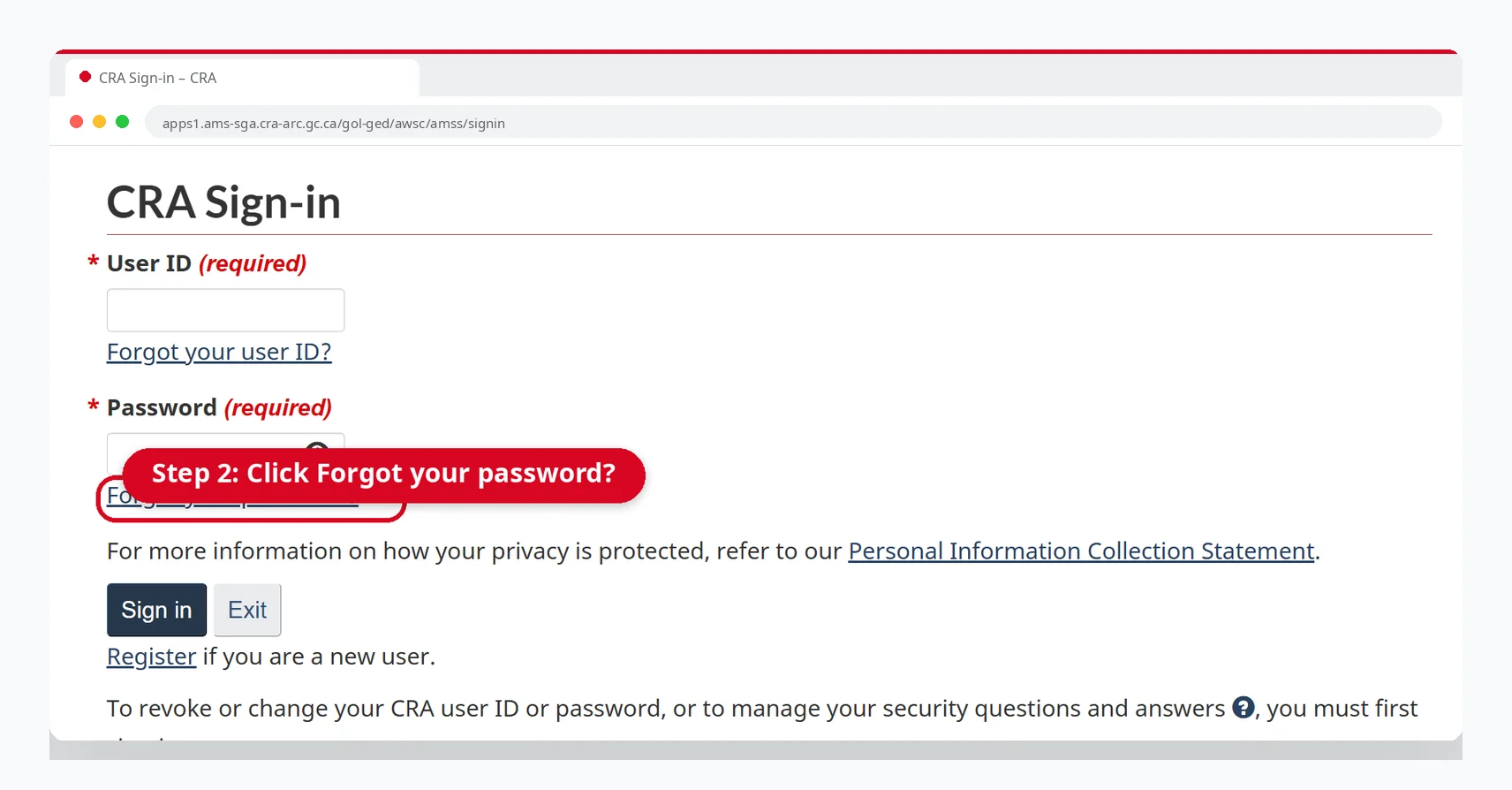
Open the official CRA sign-in page
Select the option to sign in with your user ID and password
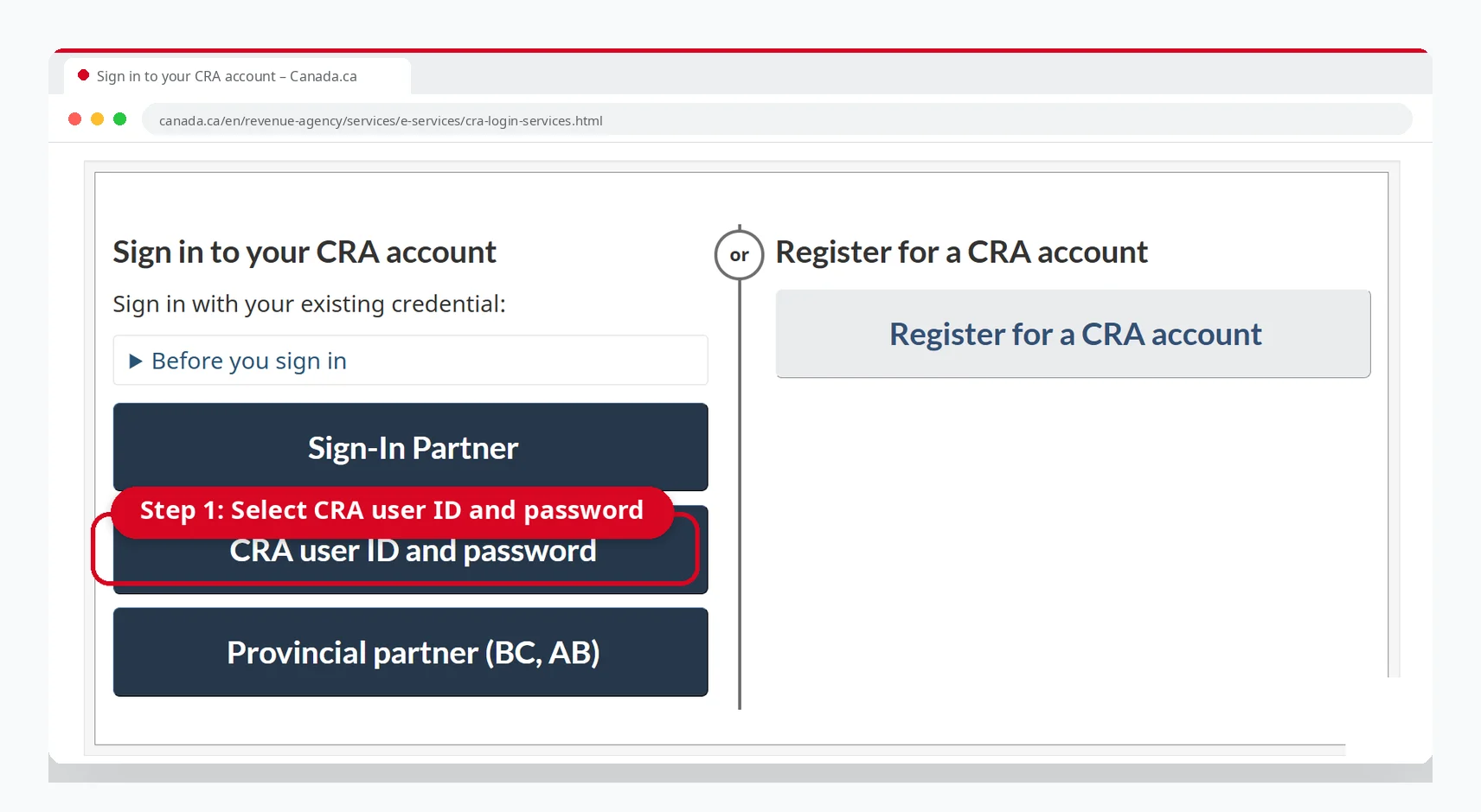
Click the forgot password
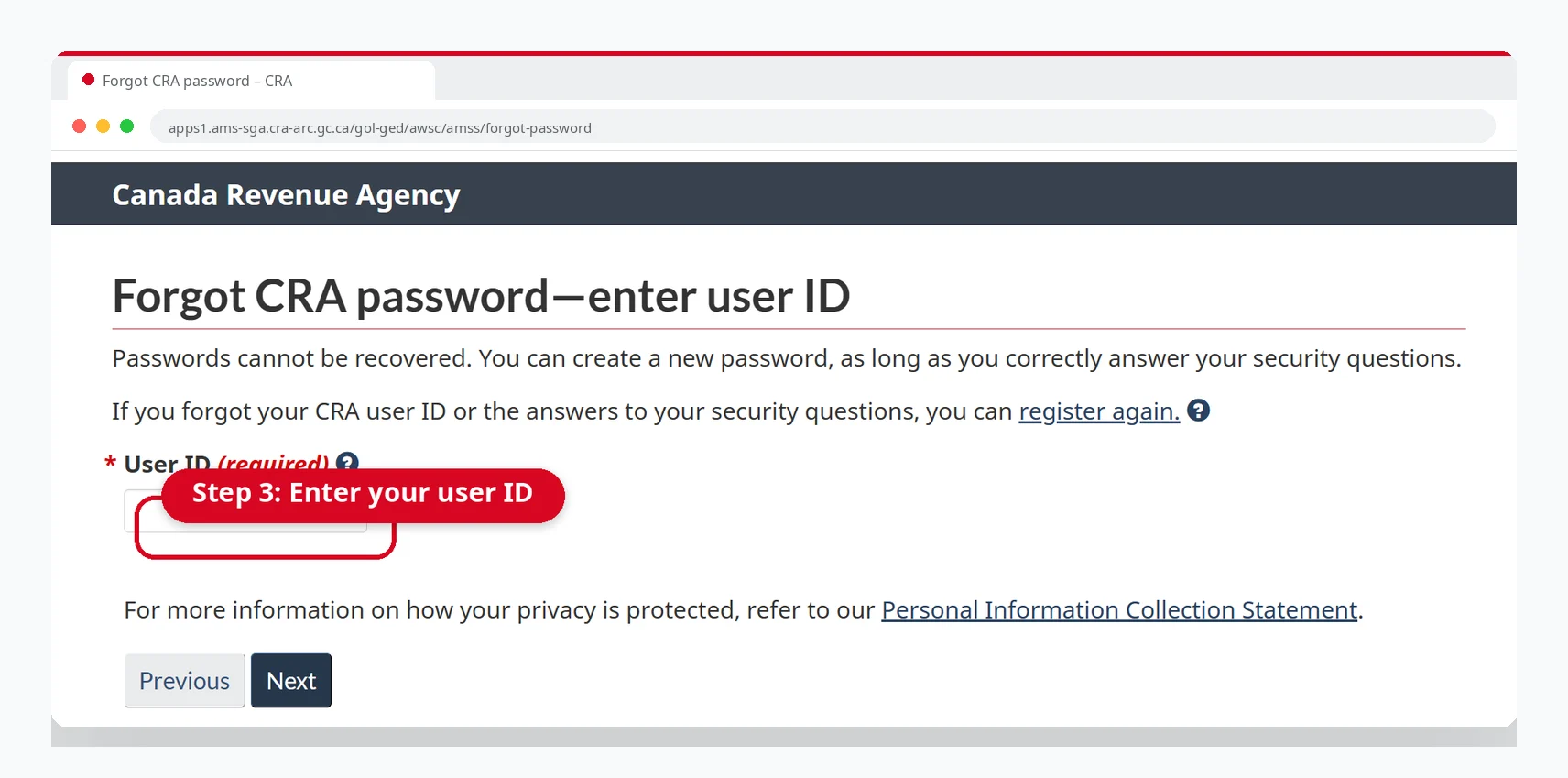
Enter your user ID and create a new password
Answer your security question
Follow the on-screen instructions to complete any further verification
Always use the CRA official website and avoid sharing your personal details on third-party sites.
Recover a Forgotten CRA User ID
Open the CRA sign-in page
Select the option to sign in with your user ID and password
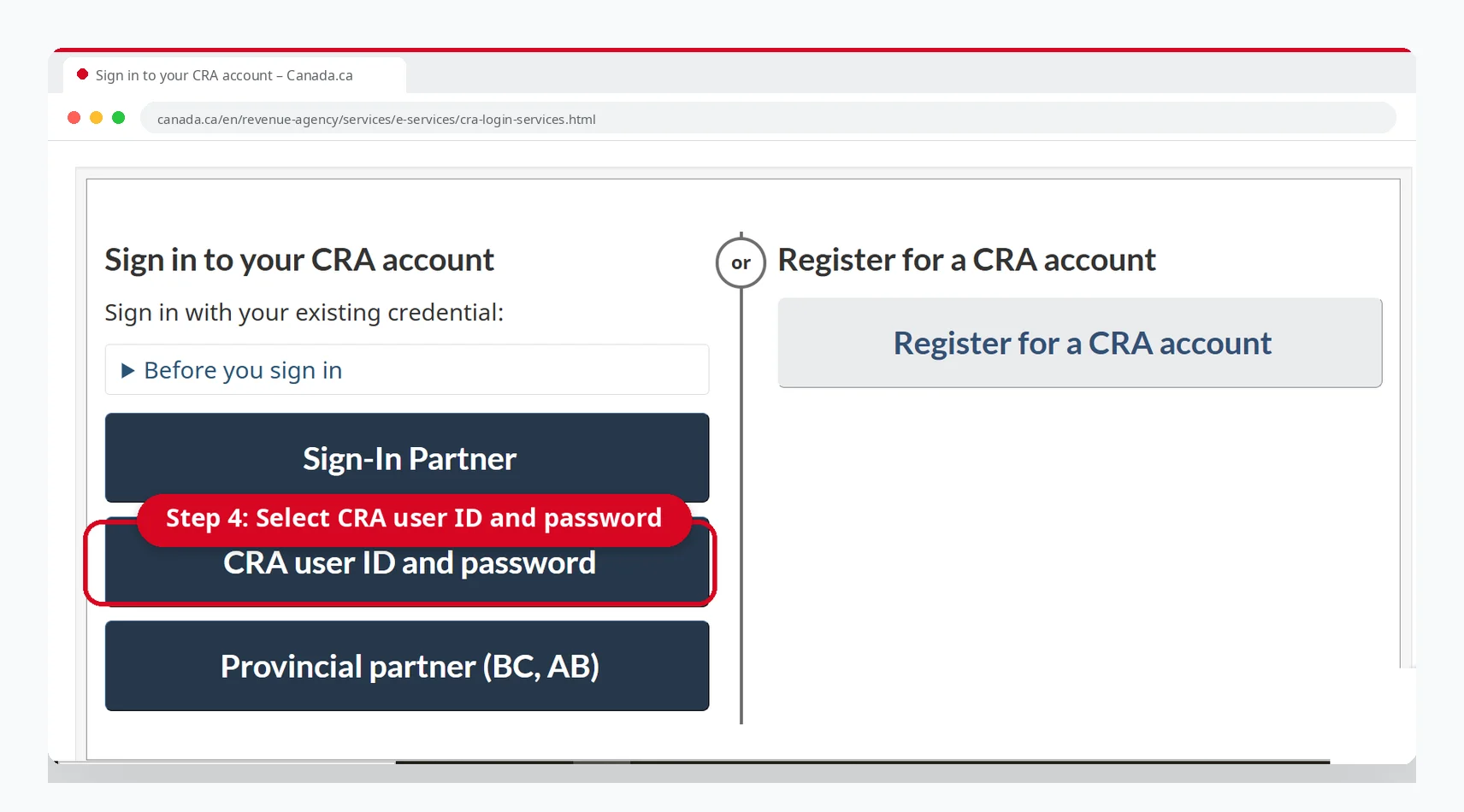
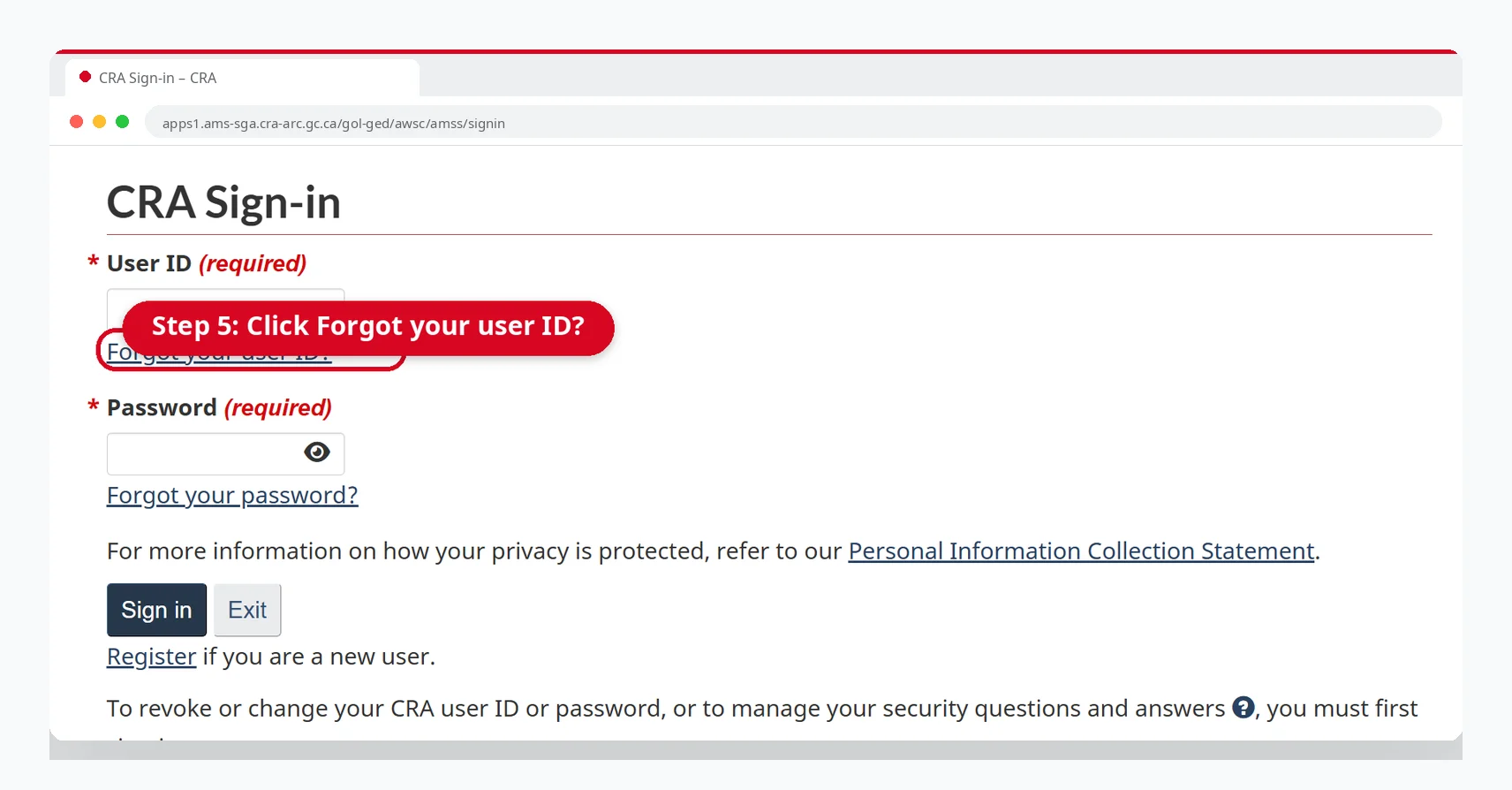
Click Forgot your ID
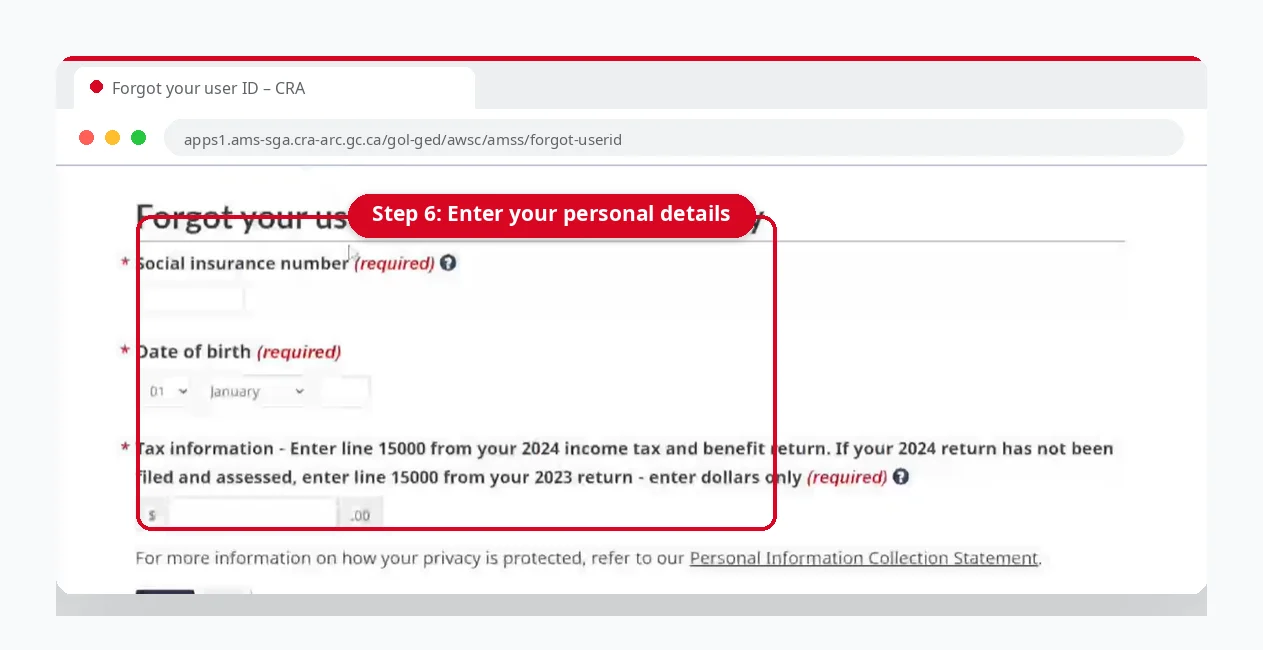
Enter your personal details: your SIN, date of birth, and the amount on line 15000 of your tax return
Answer your security question
Complete the verification to recover your user ID
Forgot Your Security Question Answers?
If you can’t remember your security question answers, you’ll need to register again. Once you create a new user ID and password, you can sign in with those instead.
Keep in mind that registering again removes the user ID and password linked to your old account.
How to Update Your Phone Number for MFA
If your phone number has changed, or the number linked to your multi-factor authentication (MFA) is no longer in use, you’ll need to update your MFA settings and add a new mobile number.
If you can’t sign in because you aren’t getting the MFA code, try an authenticator app instead. If you still can’t get a code, contact CRA support.
To add a new number:
Sign in to your CRA account using your preferred method
Open your profile
Go to the MFA settings
Choose the mobile option
Add your new mobile number
Click Save changes
Multi-factor authenticators can only support numbers from Canada, the United States, and other mobile number holders; they may need to use the authenticator app.
What to Do If Your CRA Account Is Locked or Revoked
The CRA protects your information with strict security measures. If it detects unusual activity, or if you enter the wrong credentials too many times, it may temporarily block your account. In most cases, you can regain access.
If you still can’t sign in with the correct credentials, you’ll need to register again and create a new user ID and password. If the CRA has locked your account for security reasons, contact CRA support as soon as possible.
If Your CRA User ID and Password Were Revoked
First, try signing in with a different method, such as online banking or a provincial partner. If that doesn’t work, re-register and create new credentials to regain access.
Alternative Sign-In Methods
| Method | Login method |
|---|---|
| Online banking | Go to the CRA sign-in page and select “Sign-In Partner.” Choose your participating bank or credit union and sign in using your online banking credentials. |
| Provincial partner | Select “Provincial partner (BC, AB)” on the CRA sign-in page. Choose the Alberta.ca account or BC Services Card and sign in with your provincial credentials. |
For the full sign-in steps with screenshots, see our CRA login guide.
Tips to Avoid Forgetting Your CRA Login
- Store your login details in a trusted password manager.
- Keep your email address and phone number updated so you can finish account recovery quickly.
- Choose security questions whose answers you’ll easily remember.
- Make sure you still have access to your MFA app or mobile number.
- Never share your CRA user ID or password with anyone.
- Keep your tax details prepared, since the CRA uses them to verify your identity during recovery.
Conclusion
Forgetting your CRA login is common, and you can usually fix it in a few minutes. If you’ve forgotten your password or user ID, try resetting your credentials. If you’ve forgotten your security question answers or can’t receive your MFA code, registering again can solve the problem. To avoid these issues next time, keep your credentials and your MFA backup code somewhere safe.
FAQs
What should I do if I forgot my CRA login?
Visit the official CRA website and use the password reset or user ID recovery option. You’ll need to verify your identity to finish.
How do I sign in to CRA if I forgot my security question answers?
You’ll need to register your account again with a new user ID and password.
How do I reset my CRA password?
Open the official CRA sign-in page and click “Reset password.” Complete the verification steps, answer your security question, and set a new password.